























Skip to content
SIAC
The platform to run your company's AI

Your company's AI, run and governed.

Not a chatbot: the platform your company runs its AI on. People and agents side by side, connected to your systems; governance with identity, signed policy and ledger; infrastructure you deploy and govern; and FinOps with every token in someone's name.

  • Run AIpeople and agents side by side, connected to your systems
  • Governidentity, signed policy, chained ledger, the plane and the runtime
  • Infrastructureenvironments, regions, your cloud account, dedicated instance
  • FinOpsspend by person and area, budgets, alerts, showback
  • 28 people working with agents in the last 30 days
  • 34 desktop devices governed as a fleet, with a signed policy
  • 34 infrastructure environments spun up by clients from the console
Strategist, from SIAC's cast of agents
Strategist Plans the work and hands it to specialists Knows your whole team of agents and decides who does what. Faced with a big request it builds the plan, says what each one will do and hands over in turns. Modelautomatic, picked per task Backupthe next one in the catalog if the first doesn't answer
Excel Analyst, from SIAC's cast of agents
Excel Analyst Data, formulas and analysis Builds and analyses spreadsheets with live formulas, tables and validation before delivering. ToolboxLocal OfficeFilesWorkshopModelautomatic, picked per task Backupthe next one in the catalog if the first doesn't answer
Word Writer, from SIAC's cast of agents
Word Writer Documents and professional writing Writes and edits Word documents with structure, native styles and tracked changes. ToolboxLocal OfficeFilesWorkshopModelautomatic, picked per task Backupthe next one in the catalog if the first doesn't answer
Web Researcher, from SIAC's cast of agents
Web Researcher Research on public pages Reads public web pages, extracts and compares information, and always cites the source. ToolboxWebFilesWorkshopModelautomatic, picked per task Backupthe next one in the catalog if the first doesn't answer
Power BI Analyst, from SIAC's cast of agents
Power BI Analyst Models and analysis in Power BI Queries the models open in Power BI Desktop with DAX and delivers reports with real data from the model. ToolboxPower BI DesktopWorkshopFilesModelautomatic, picked per task Backupthe next one in the catalog if the first doesn't answer
Desktop Assistant, from SIAC's cast of agents
Desktop Assistant Files and apps on the device The day to day of the computer: finding, sorting, reading and producing files, and working with the open applications. ToolboxFilesApplicationsClipboardLocal OfficeModelautomatic, picked per task Backupthe next one in the catalog if the first doesn't answer

Every agent has a role, a toolbox and a face of its own. Hover over them: their sheet, just like in the product.

Side by side

People decide. Agents do.

A claim with attachments, a month-end close, a bid response. All of it has steps, waits, and a moment when someone has to put their name on it. That is where the process stops and the person confirms, asks for more, or rejects. It picks up at exactly that point: it doesn't start over, doesn't guess, doesn't go on without you.

And one rule changes everything: on the desktop and in the add-ins, the actor is the person. The agent lends brains, toolbox and judgement; permissions, spend and policy stay those of whoever is sitting at the computer.

It works both ways. An agent can also leave you an assignment —“I'm missing the department's signature”— and you see it in your inbox, with its date, like any task of yours.

14 playbooks in production, each with its human step measured on 2026-09-04

5.4 : 1 is the input-to-useful-output ratio across playbook missions measured on 2026-08-24

Does your case look like this?Tell us the process where someone has to put their name on it todayTell us your case
Side by side · one assignment The actor is the person
Person
Agent
Assignment The person assigns it
Agent's work Reads, cross-checks, drafts
Human intervention Confirm · Ask for more · Reject ConfirmAsk for moreReject
Handover Another specialist takes over
Deliverable With its full trail
Where judgement is needed, the process stops and waits for the person. It picks up exactly there: it doesn't start over, doesn't guess, doesn't go on without you.
Playbook · Claim with attachments In progress
  1. Agent's work
    Task An agent with a trade does its share of the work.
  2. Step enabled
    Decision The process branches on what it found.
  3. Agent selected
    Parallel Two agents work at once, each on its own.
  4. Human intervention resolved
    Human intervention A person confirms, asks for more, or rejects. The process waits. ConfirmRequest informationReject
  5. Tool executed
    Handover Another specialist takes over, and its share is charged under its name.
  6. Mission completed
    Close The deliverable goes out with its full trail. Signed deliverable
The ledger on the left is chained: every line carries the fingerprint of the previous one, so a later touch-up shows.

A coordinated team of agents, with the person at the critical points

Every agent has a role, a toolbox and a face. One reads case files, another squares the numbers, another writes on your brand template. Above them all is one that carries no tools: it plans and delegates. When a job needs four roles, it calls them in turn, announces each handover, and each one's share stays under its own name.

Look at a face and you'll see its sheet, the same one the operator sees in the Agent Center. Ten of the sixteen are free, for the roles your company defines.

434 skills available to build a toolbox from measured on 2026-09-04

57 agents in production, each with its role and its face measured on 2026-09-04

Power BI Analyst, from SIAC's cast of agents
Power BI Analyst Models and analysis in Power BI Queries the models open in Power BI Desktop with DAX and delivers reports with real data from the model. ToolboxPower BI DesktopWorkshopFilesModelautomatic, picked per task Backupthe next one in the catalog if the first doesn't answer
Excel Analyst, from SIAC's cast of agents
Excel Analyst Data, formulas and analysis Builds and analyses spreadsheets with live formulas, tables and validation before delivering. ToolboxLocal OfficeFilesWorkshopModelautomatic, picked per task Backupthe next one in the catalog if the first doesn't answer
Desktop Assistant, from SIAC's cast of agents
Desktop Assistant Files and apps on the device The day to day of the computer: finding, sorting, reading and producing files, and working with the open applications. ToolboxFilesApplicationsClipboardLocal OfficeModelautomatic, picked per task Backupthe next one in the catalog if the first doesn't answer
Web Researcher, from SIAC's cast of agents
Web Researcher Research on public pages Reads public web pages, extracts and compares information, and always cites the source. ToolboxWebFilesWorkshopModelautomatic, picked per task Backupthe next one in the catalog if the first doesn't answer
Word Writer, from SIAC's cast of agents
Word Writer Documents and professional writing Writes and edits Word documents with structure, native styles and tracked changes. ToolboxLocal OfficeFilesWorkshopModelautomatic, picked per task Backupthe next one in the catalog if the first doesn't answer
Systems Technician, from SIAC's cast of agents
Systems Technician Terminal, repositories and containers Technical work on the device: terminal, version control, containers and database queries, carefully. ToolboxTechnical (pro)Modelautomatic, picked per task Backupthe next one in the catalog if the first doesn't answer
Lupa, from SIAC's cast of agents
Lupa Free face The role, the toolbox and the budget are defined by your organization in the Agent Center.
Circuito, from SIAC's cast of agents
Circuito Free face The role, the toolbox and the budget are defined by your organization in the Agent Center.
Brizna, from SIAC's cast of agents
Brizna Free face The role, the toolbox and the budget are defined by your organization in the Agent Center.
Brote, from SIAC's cast of agents
Brote Free face The role, the toolbox and the budget are defined by your organization in the Agent Center.
Radar, from SIAC's cast of agents
Radar Free face The role, the toolbox and the budget are defined by your organization in the Agent Center.
Neón, from SIAC's cast of agents
Neón Free face The role, the toolbox and the budget are defined by your organization in the Agent Center.
Disco, from SIAC's cast of agents
Disco Free face The role, the toolbox and the budget are defined by your organization in the Agent Center.
Gráfica, from SIAC's cast of agents
Gráfica Free face The role, the toolbox and the budget are defined by your organization in the Agent Center.
Diadema, from SIAC's cast of agents
Diadema Free face The role, the toolbox and the budget are defined by your organization in the Agent Center.
Strategist, from SIAC's cast of agents
Strategist Plans the work and hands it to specialists Knows your whole team of agents and decides who does what. Faced with a big request it builds the plan, says what each one will do and hands over in turns. Modelautomatic, picked per task Backupthe next one in the catalog if the first doesn't answer
Connected

An agent is worth what it can touch

An agent that can only talk is an intern with no system access. SIAC's agents get into your CRM, your accounting, your folders, your messaging with your organization's credentials, and every action lands in the ledger under its name.

The guarantee is simple to say and hard to build: what an agent cannot touch is never even offered to it. Without the matching connection, the skill doesn't appear in its toolbox. It doesn't try it, doesn't ask for it, doesn't see it.

A connection can belong to the organization or to you —your own folder, your own calendar— and the agent tells the two apart: what's yours is used with you and shows up in nobody else's work.

And what isn't in the catalog connects just the same: any system that speaks the open tools protocol joins as one more. Even a web portal with no API: the agent works inside it with your session, the way you would.

16 connectors in the catalog, ready to connect per organization measured on 2026-09-03

Does your case look like this?Tell us which systems the agent would have to touchTell us your case
Connections · what the agent can touch 16 connectors
Salesforce Siigo Google Drive HubSpot Slack Notion
Excel Analyst, from SIAC's cast of agents
Excel Analyst Data, formulas and analysis Builds and analyses spreadsheets with live formulas, tables and validation before delivering. ToolboxLocal OfficeFilesWorkshopModelautomatic, picked per task Backupthe next one in the catalog if the first doesn't answer
Toolbox of Lente
  • Read and create opportunities
  • Look up vouchers and third parties
  • Read authorized folders personal
  • Contacts and deals no connection, not listed
The toolbox doesn't promise what it can't deliver: without the connection, the skill isn't even offered. Connections belong to the organization or to the person.
One platform

You govern, you measure, and you depend on no model and no cloud

GovernYour org chart, with a budget and a brake

Your company is modelled as it is: group, divisions, departments, teams, and the projects that cut across several areas at once. Permissions are inherited down that tree and the budget flows down it, with an automatic cut-off at every level.

Scope is decided by the server, not the screen. A leader sees their whole branch and none of the others: the interface isn't hiding it; it simply isn't served.

The plane and the runtime

SIAC is two pieces. The plane sets identity, signs the policy, keeps the model catalog and holds the ledger. The runtime, on every computer, phone and add-in, executes and does not decide: what the policy doesn't allow is rejected on the device, without asking anyone.

25 modules with a permission of their own measured on 2026-09-02

53 functions granted one by one measured on 2026-09-02

Usage center · Org chart Current month
  1. Group 12,4 M
  2. Sales Division 5,1 M
  3. Sales Team 2,3 M
  4. Presales Team 2,8 M
  5. Legal Division 4,6 M
  6. Finance Directorate outside your analysis scope
Example figures. What isn't an example is the rule: the branch that isn't yours shows as structure and never with figures.
The plane and the runtime Executes, doesn't decide
Plane · Gateway
identitysigned policymodel catalogledger
Computer Runtime policy v12 · signed ledger · chained
Phone Runtime policy v12 · signed rejected on the device ledger · chained
Add-in Runtime policy v12 · signed ledger · chained
  1. the policy comes down signed to every device
  2. one device rejects locally what the policy doesn't allow
  3. the ledger of all three goes up to the plane, chained
The plane decides once and signs; the runtime complies without asking, even if the plane is away. That's why a policy can't be bypassed from a device.

MeasureKnowing whether the AI is well spent

Almost nobody measures what matters: how many input tokens are paid for each useful output token. SIAC judges it against the band of its activity class, which is why it finds leaks a conventional dashboard never sees. An estimated saving never adds to the total.

And a good part of an agent's context repeats. The platform reuses it instead of processing it again, and measures that as efficiency, with its figure.

6 activity classes, each with its own band measured on 2026-09-02

12 dimensions to slice the spend by measured on 2026-09-02

AI Health · Input : output ratio by class Last 90 days
  • Conversational chat Healthy
  • Assistant with tools Healthy
  • Agentic code loop Probable leak
  • Document generation Healthy
  • Office add-in Healthy
  • Classification and routing Healthy
Finding A tool with an external key sends 268 times more context than its activity justifies. detectacceptapplymeasure
A saving only enters the total if it was measured before and after. An estimated saving doesn't count.
AI Health · cache efficiency 19.1 % of the input, reused
First requestinstructions · case file · contextwhat's new
Second requestreusedwhat's new
Efficiency in the controlled experiment87 %of the input served from cache · measured on 2026-08-23
An efficiency indicator, not a promise: it measures what was reused, and says so.

SwitchThe models and the cloud your company chooses

Models are added, swapped and retired in the catalog without touching a single client. The router picks by task, and your company pins its own whenever it wants.

If a provider goes down, the next request goes out through another with nothing changing on the person's side. That is the gesture that means “you depend on none of them”.

The same goes for infrastructure: shared platform, dedicated instance with your server and your encryption key, or your own cloud account, in the region you choose. Same product, zero bespoke builds.

And continuity isn't promised: it's rehearsed. If the whole region goes down, the platform comes up in another; the way back is scheduled with you and verified table by table.

31 s to come up in the other region, against a 30-minute commitment measured on 2026-08-22

19 s of work lost, against a 5-minute commitment measured on 2026-08-22

One platform · depending on no one 11 models in the catalog
ExcelWordDesktopPhone
SIAC governancemeasurementrouting
ModelsCloud
Huawei Cloud in use Google Cloud tested Alibaba Cloud · Qwen compatible
Huawei Cloud in use Google Cloud compatible
SharedDedicated instanceYour cloud account
Trademarks belong to their owners. Compatibility, not endorsement. “In use” serves requests today; “tested” answered a real request, with a date; “to be tested” has its code branch; “compatible” speaks the industry's open standard or runs in containers. Oracle is a registered trademark of Oracle and/or its affiliates; other names may be trademarks of their respective owners.
Does your case look like this?Tell us how you govern AI today and what slips throughTell us your case
Infrastructure

Infrastructure you deploy and govern

Spinning up an environment isn't opening a ticket. From the console you create a server with its address and its own domain, in the region you choose, and it shows up with its cost of the day next to your agents.

When nobody uses it, it hibernates on its own and its cost drops to zero; when it's needed again, it wakes up with everything inside. What you pay for is what runs.

It can run on the platform's cloud account or on yours. And your organization's dedicated instance runs in containers: the same version on your server, in your cloud or in a data center, with no bespoke builds..

Desktop devices are infrastructure too: they're governed as a fleet, with a signed policy and updates with a deadline.

34 environments created by clients from the console measured on 2026-09-04

2 regions enabled to deploy in measured on 2026-09-04

2 cloud accounts connected, the platform's or the client's measured on 2026-09-04

34 desktop devices governed as a fleet measured on 2026-09-04

Does your case look like this?Tell us where your software runs today and where you want it to runTell us your case
Infrastructure · environments and cloud account 34 environments
customer-portal region A running cost of the day0.42 own domain · active
reconciler region A hibernated cost of the day0.00 own domain · active
orders-api region B running cost of the day0.42 own domain · active
sales-board region B stopped cost of the day0.00 own domain · active
brand-canvas region A hibernated cost of the day0.00 own domain · active
new-environment region B creating… cost of the day0.00 own domain · active
Cloud account the platform's yours
Dedicated instance your server · your database · your key · containers
Environments are examples. The measured figures are in the section: environments created, regions, cloud accounts.
The SIAC Mesh

Your servers, your agents and your AI, in one governed network

Until now, every server was an island: to touch it, someone had to sit at its console or lend a password. The SIAC Mesh joins them into a single network where your agents, Airo, your technical team and your own servers work together, and where anything that can't be undone is decided by a person.

ConnectEvery server, a node with its own identity

Each server gets its own identity, signed by SIAC and renewed every day, and declares what can be done with it and at what risk. It starts switched off: its owner turns it on and chooses what it exposes.

There is one line that is never crossed: servers running a dedicated SIAC instance never join the mesh. It isn't a disabled option; it's the design.

24 h lifetime of each server identity; it renews itself measured on 2026-09-26

12 tools with their declared risk on every server, from the moment it joins measured on 2026-09-26

The SIAC Mesh One door, the whole ecosystem
Who asks The door Your servers
  • Your agents with their toolbox and budget
  • Airo the console assistant
  • Coding assistant of your technical team
  • Another server through a granted route
SIAC
  1. identity
  2. risk
  3. confirmation
  4. ledger
open protocol · MCP
  • ERP accounting and inventory identity · 24 h on
  • Customer portal with your domain and brand identity · 24 h on
  • Data off: its owner decides identity · 24 h off
  • Outside server joined with a code identity · 24 h on
Dedicated SIAC instance outside the mesh, by design
  1. each server receives its signed identity
  2. its owner turns it on and chooses what it exposes
  3. whoever asks comes in through the door, and sees only their own
  4. the dedicated instance never joins
Example names. The rule is real: no identity, no node; not turned on, no tools; and no request skips the door.

OperateOne single door, and the irreversible asks first

The mesh speaks MCP, the open tools protocol. Your agents, Airo, your technical team's coding assistants and other servers all come in through the same door, and each one sees exactly what the person using it would see.

Every tool declares its risk. Reading runs instantly; anything that could reveal a secret arrives redacted; and whatever writes, reaches outside or can't be undone waits for a person to approve those exact arguments.

Everything lands in a ledger that is never deleted: who asked for what, through which channel and what happened, whether it was a person, an agent or a server.

10 min to approve the irreversible; then it expires, and each approval works only once measured on 2026-09-26

The irreversible asks first An agent proposes, a person decides
  1. Support agentoverwrites
    restart the «orders» service on ERP
  2. Waiting for a personexpires in 10:00
    service: orders · reason: not responding since 9:12
  3. approved by Laura, administrator · single use
  4. ledger · support agent · restart · approveddone in 2.1 s
  1. the agent asks
  2. the door stops it and notifies
  3. a person approves those arguments
  4. it runs and lands in the ledger
  • readsruns instantly
  • could revealarrives redacted
  • writes or reaches outwaits for a person
  • can't be undonealways a person
Example names and times. The rule is real: the approval expires after ten minutes, works once, and nobody —not an agent, not an administrator through the door— can skip it.

GrowServers that talk to each other, domains with your brand

  • By default no server sees another. A route lets one ask another for specific tools, with an expiry date and a written reason.

  • A server can publish several domains, each with the brand of whoever uses it: SIAC checks it points where it should and the security padlock is issued automatically.

  • A server SIAC didn't create joins with a single-use code, and only connects outwards: no port needs to be opened.

  • And your published agents accept tasks from other systems through the open agent-to-agent standard, with their own model, budget and ledger.

22 s from activating a new domain to serving it with a padlock, measured in production measured on 2026-09-26

15 min validity of the code that joins an outside server; it burns on use measured on 2026-09-26

How it applies in your company

Four situations solved today with borrowed passwords, tickets or favors, and how they look with the mesh.

  1. Support without borrowed passwords

    BeforeTo check a server, someone shares their access and afterwards nobody knows what was touched.

    With the meshYour agent reads the server's status and logs and proposes the fix; the restart waits for your go-ahead and is written down.

  2. Your technical team, with its AI assistant

    BeforeEvery developer connects their assistant however they can, with access nobody keeps track of.

    With the meshIt connects to the door with a personal key and sees only its organization's servers; anything destructive asks you first.

  3. Your ERP and your portal, talking

    BeforeThe portal pulls data from the ERP through a custom integration nobody dares to touch.

    With the meshA route grants the portal a single ERP tool —check inventory—, with an expiry date and every call in the ledger.

  4. Your brand on your domain

    BeforePublishing a system on your own domain meant a ticket to the vendor and an expired certificate every so often.

    With the meshYou register the domain, SIAC checks it points right and serves it with a padlock; if it's SIAC, it opens with your logo and colors.

Nothing that already runs changes when you turn the mesh on: your organization decides what it connects, server by server and agent by agent.

Does your case look like this?Tell us which servers and systems you want your agents to operateTell us your case
FinOps

Every token has an owner

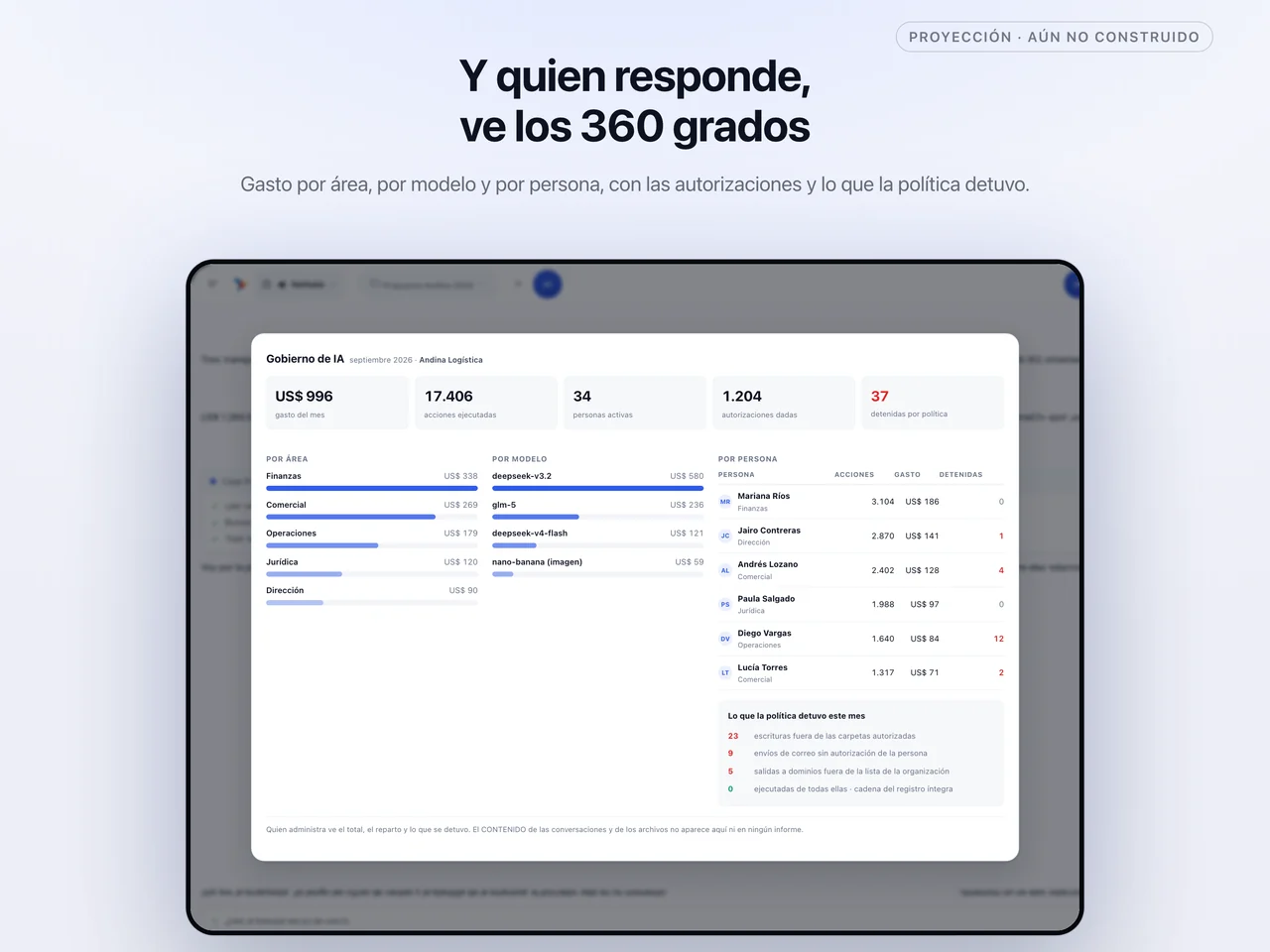
Every AI request is sealed with the person, the area and the project of the moment. Spend flows from group to division, to team, to person, and can be read by any of those dimensions.

The budget flows down the tree too, with an automatic cut-off at every level and a warning before it's reached: a team that exhausts its quota stops, and nobody finds out from a month-end surprise.

And at the close, the internal allocation of spend by area comes out on its own, with each one's activity class and health band: showback for every area and, if your company decides so, chargeback between them.

12 dimensions to read spend by measured on 2026-09-02

6 activity classes, each with its health band measured on 2026-09-02

28 people with spend under their name in the last 30 days measured on 2026-09-04

Does your case look like this?Tell us how you split AI spend across your areas todayTell us your case
FinOps · spend with an owner Current month
  1. Group 62 %
  2. Sales Division 70 %
  3. Presales Team 96 % 80 % · warning sent quota reached · stopped
  4. Ana Restrepo 58 %
  5. Legal Division 41 %
September allocation · by area
Sales Division58 %healthy
Legal Division31 %healthy
Finance Directorate11 %watch
Example figures. The rule is real: spend is sealed with the unit of the moment, the budget cuts off per level and the allocation comes out of the usage center.
No caps

Grow without asking the product for permission

No product caps. As many users, agents, playbooks and skills as your operation needs, from day one. If your company wants a quota, it sets one, per area or per team; the product ships with none.

For integrations, API keys with no limit on how many, each with the budget you decide. One key per system that connects, with its usage under its own name.

And your own catalog: skills, toolboxes, business categories, brand kits and knowledge spaces, with no limit on pieces. What your company builds is its own and grows with it.

34 development environments spun up by clients, each with its own address measured on 2026-09-04

21 projects opened from the desktop, with their authorized folders measured on 2026-09-04

Does your case look like this?Tell us how many people and processes you want to bring inTell us your case
Growth · no product caps You set the quota
Users 43 No per-seat quota
Agents 57 As many as you have trades
Playbooks 14 Every process, with a version
API keys 129 With the budget you decide
Your organization's quota If your company wants a cap, it sets one. The product doesn't.
Starting figures measured on the platform on September 3, 2026. From there on, the counter only shows there is no ceiling.
Your AI

An AI that knows you, on a team your company approves

Every person has their profile, their memory and their projects, and they follow them to every surface. What you told the agent in Excel on Tuesday, it knows on your phone on Thursday: how you write, what you prefer, what you're working on.

Your memory is yours. Neither your administrator nor your colleagues read it. The organization governs which agents you see and how much you spend; what the agent learns about you stays with you.

And you work with the team of agents your company approves for you, per person, per role or per area. Sales sees the one that reads contracts; treasury sees the one that squares the numbers. Each with its face, so you know who's who without reading.

43 active people on the platform, each with their own profile measured on 2026-09-04

38 memories stored, private to whoever dictated them measured on 2026-09-04

Does your case look like this?Tell us what the AI needs to know about each person on your teamTell us your case
My AI Profile · memory across surfaces 38 memories stored
Ana RestrepoSales · North Division
  • Direct tone, no frills
  • Writes in the third person
  • Answers in neutral Spanish
Your memory · yours alone
  • ExcelPrefers tables, no decorative charts
  • DesktopProject “Tender 2027”: authorized folder
  • PhoneAlways cites the source and the date
Neither your administrator nor your colleagues read it.
Who you work with · approved by your organization
Lente Gráfica Sabio Radio Brizna
Two aren't approved in your area: they don't show up to pick.
Your profile and memory follow you to every surface. Agents are the organization's specialists; which ones you see is its call.
The studios

Where AI is designed, tested and published

A company's AI isn't bought ready-made: it's built from its processes. SIAC's studios are the rooms where that happens. In the Agent Center an agent gets its trade, its instructions and its face. In the Skills Factory, its toolbox. In Playbooks, the process with its human step.

Then it's tested against trial data, and published. Publishing is an act with a number: every mission freezes the exact version it ran with, so the audit from six months ago can be rebuilt in full.

And you don't need to be technical. Airo Builder creates and edits agents and playbooks in conversation, keeps every version and lets you go back. For what isn't an agent —an application, a dashboard— there are Dev Studio and Canvas, on your own infrastructure.

8 house agents, ready to approve in any organization measured on 2026-09-04

434 skills in the Factory, to build toolboxes from measured on 2026-09-04

Does your case look like this?Tell us which agent you want to build firstTell us your case
The studios · from idea to published version Airo Builder · v2 → v3 · undo
Agent CenterTrade, instructions, face identity
Skills FactoryToolbox toolbox
PlaybooksThe process, with its human step process
TestAgainst trial data test
PublishImmutable version v3
Brote, moving down the line v3
An agent's sheet, seven fields objectiveinstructionstoolsknowledgepermissionsbudgetsuccess criteria
Dev StudioCanvasBrand kits
Every mission freezes the exact version it ran with. Publishing is an act, with a number and a way back.
Inside and outside

Inside, where your people work. Outside, where your customers are.

Nobody adopts a tool that makes them switch windows all day. SIAC shows up inside Word, Excel, Outlook, the browser, the desktop and the phone, with the same signed policy and the same ledger in all of them.

And outward, where your customers are: WhatsApp, web chat and your contact center. A message comes in, a playbook handles it, and if a person is needed, they finish it from their phone. The same process and the same ledger on both sides.

11 surfaces where the agent works under the same policy measured on 2026-09-02

Channels · inside and outside One ledger
WhatsApp Web chat Contact center
  • A message comes inover WhatsApp, from outside the company
  • A playbook handles itthe Link: the same process, on the channel
  • A person finishes itfrom their phone, with their ledger
Inside, where your people work. Outside, where your customers are. The same playbook and the same ledger on both sides.
Inside · your people
  • DesktopWindows and macOS, with its policy
  • MobileiPhone and Android, with Face ID
  • WordDrafts on your brand template
  • ExcelFormulas and sheets in your format
  • PowerPointDecks on your designs
  • OutlookDrafts; you decide when to send
  • TeamsSummarizes threads and pulls out decisions
  • BrowserReads, fills in and actually navigates
Outside · your customers
  • WhatsAppThe company's channel, with a playbook
  • Web chatOn your site, with your brand
  • Contact centerYour service platform, with the same ledger
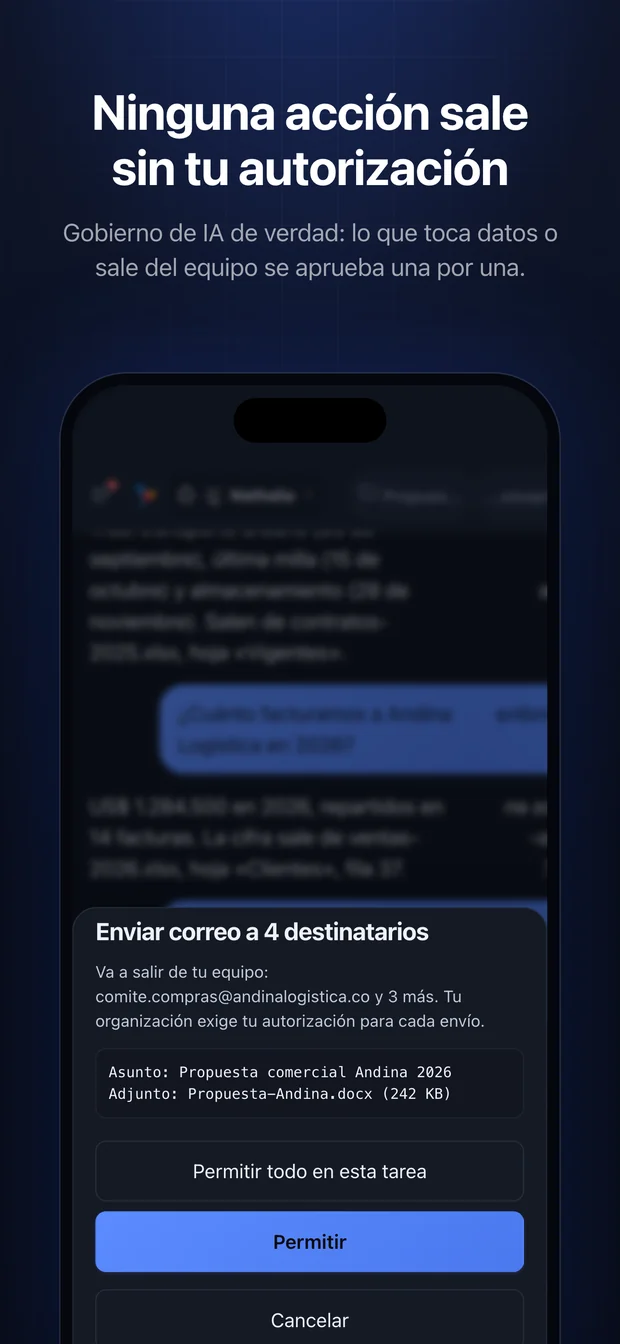
SIAC on a phone, asking for authorization before an action that leaves the device.
Anything irreversible always asks first.
SIAC's governance dashboard on a tablet, with spend by area.
The same governance, on any screen.
Does your case look like this?Tell us where your customers and your people talk to youTell us your case
Get started

Tell us a use case. We tell you how it's tackled.

SIAC comes in through the organization, not through personal accounts. If you already work with us, your console is one click away. If not, let's start with the process that hurts most.

Ask SIAC